
An office relocation is a major milestone for any business. Whether you are moving to a larger workspace, downsizing, or relocating to a more strategic location, the process can disrupt daily operations if not managed properly. Downtime during an office move can lead to lost productivity, missed opportunities, delayed projects, and frustrated employees and clients. Fortunately, with careful planning and the right approach, businesses can significantly reduce disruptions and maintain continuity throughout the relocation process.
Start Planning Early
The key to a successful office move is preparation. Ideally, planning should begin several months before the moving date. Create a detailed relocation timeline that outlines every stage of the move, including packing, equipment disconnection, transportation, setup, and testing.
Assign a dedicated move coordinator or project manager to oversee the process. This individual should communicate with department heads, removal companies, IT teams, and employees to ensure everyone understands their responsibilities and deadlines.
Early planning helps identify potential challenges before they become major problems, reducing the risk of unexpected delays.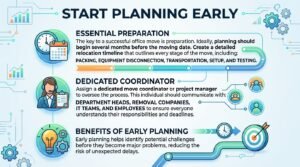
Conduct a Comprehensive Office Audit
Before moving, perform a thorough assessment of your current office. Identify all furniture, equipment, technology assets, and documents that need to be relocated.
This is also an excellent opportunity to declutter. Dispose of outdated equipment, unnecessary furniture, and obsolete files. Reducing the number of items being moved not only lowers relocation costs but also speeds up packing and setup at the new location.
An inventory list ensures that nothing is lost during the move and helps employees quickly locate essential items after relocation.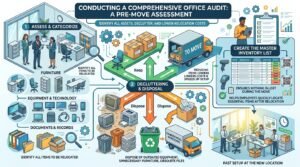
Develop a Detailed Moving Strategy
Every office move should have a clear strategy. Divide the relocation into manageable phases rather than attempting to move everything at once.
Consider:
- Packing schedules
- Department-specific moving plans
- Equipment relocation procedures
- IT infrastructure migration
- Employee workspace assignments
- Business continuity measures
By breaking the project into smaller tasks, businesses can maintain some level of operation throughout the move.
Schedule the Move During Off-Peak Hours
One of the most effective ways to minimise downtime is to schedule the move outside normal business hours. Many companies choose evenings, weekends, or public holidays to relocate.
Moving during non-working hours allows employees to continue their regular duties without interruption and provides removal teams with uninterrupted access to the premises.
Although weekend moves may involve slightly higher service costs, the reduction in lost productivity often makes the investment worthwhile.
Prioritise IT Infrastructure
Technology is the backbone of modern business operations. Even a short interruption to internet access, phone systems, servers, or cloud services can affect productivity.
Work closely with your IT department or managed service provider to create a technology migration plan. This should include:
- Data backups
- Server relocation procedures
- Internet installation scheduling
- Network testing
- Telephone system setup
- Security system configuration
Whenever possible, install and test internet connectivity and network infrastructure before employees arrive at the new office. Ensuring that all systems are operational on day one significantly reduces downtime.
Communicate Clearly with Employees
Employees play a vital role in a successful office move. Keep staff informed throughout the process and provide regular updates regarding timelines, expectations, and responsibilities.
Share information such as:
- Moving schedules
- Packing instructions
- New office layouts
- Workspace assignments
- Parking and transportation details
When employees understand the relocation plan, they can prepare effectively and return to work more quickly after the move.
Open communication also helps reduce uncertainty and stress, leading to a smoother transition.
Inform Clients and Business Partners
Maintaining communication with clients, suppliers, and stakeholders is equally important. Notify them well in advance of your relocation plans and provide updated contact information.
Consider sending:
- Email announcements
- Website notifications
- Social media updates
- Business directory updates
If there will be any temporary service interruptions, communicate these clearly and provide alternative contact methods where possible.
Keeping customers informed helps maintain trust and prevents misunderstandings during the transition period.
Use Professional Office Removal Services
Hiring experienced office movers can significantly reduce relocation-related downtime. Professional removal companies understand how to move office furniture, IT equipment, confidential documents, and specialist assets safely and efficiently.
Professional office movers typically provide:
- Detailed move planning
- Packing services
- Furniture dismantling and reassembly
- Secure transportation
- Equipment handling expertise
- Insurance protection
Their experience helps avoid common relocation mistakes that can lead to delays and business disruptions.
Prepare the New Office Before Moving Day
The new workspace should be fully prepared before relocation begins. Essential services such as electricity, internet, water, heating, and security systems should be installed and tested in advance.
Ensure that:
- Workstations are allocated
- Meeting rooms are ready
- Network connections are operational
- Access control systems are functioning
- Health and safety requirements are met
The more preparation completed beforehand, the faster employees can resume normal operations after arrival.
Test Everything Immediately After the Move
Once the relocation is complete, conduct a comprehensive post-move inspection. Verify that all equipment, systems, and services are functioning correctly.
Check:
- Computers and monitors
- Internet connectivity
- Telephone systems
- Printers and scanners
- Security systems
- Meeting room technology
Addressing technical issues immediately prevents small problems from becoming major disruptions.